tokenwise routes every piece of coding work to the right model and effort, across Claude, ChatGPT Codex, Gemini and free models. When one plan runs low, the work moves on to the next. A Mac app (and a local web app elsewhere).
Works with the plans you already have
Grepping a repo doesn't need your strongest model. Debugging a race condition does. tokenwise makes that call for every piece of the job.
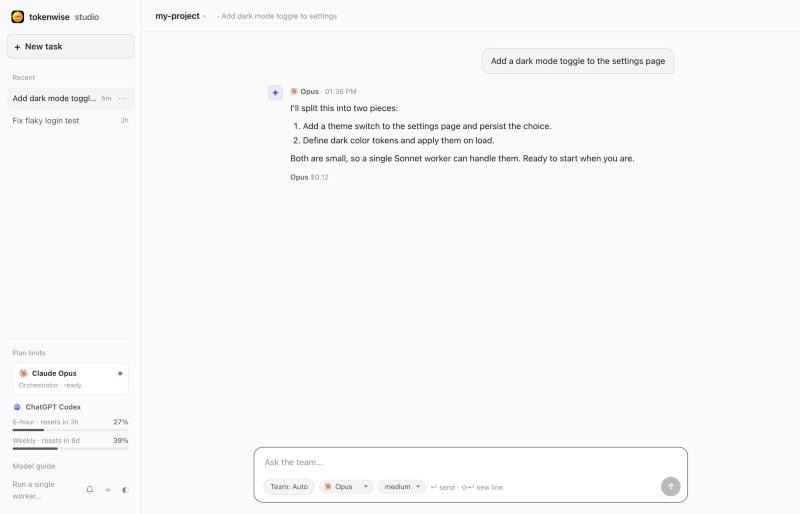
Type what you want in plain words. The orchestrator (Claude) reads the project and splits the work.
Each piece goes to the cheapest worker that can do it well, in its own git worktree.
Nothing touches your project until you approve it. Per-file diffs, one click to apply, one to commit.
A worker near its limit or a rate-limit error moves the job to the next one: Codex, Gemini, Claude, then free models. The orchestrator has a fallback too.
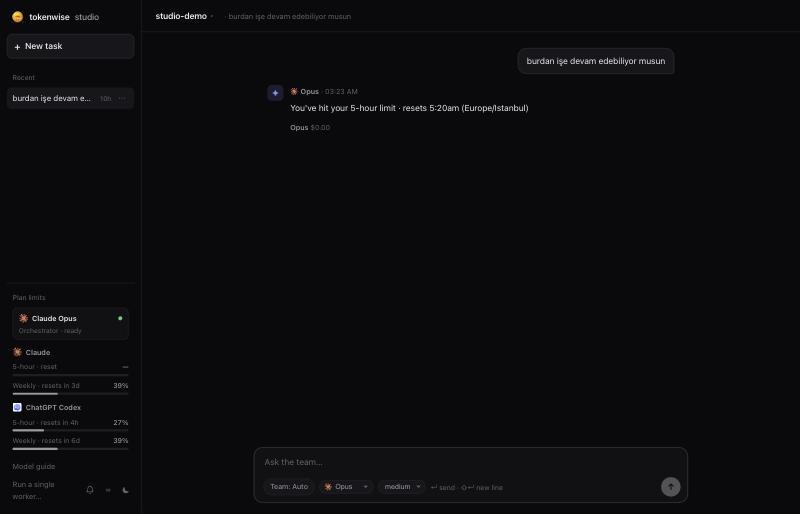
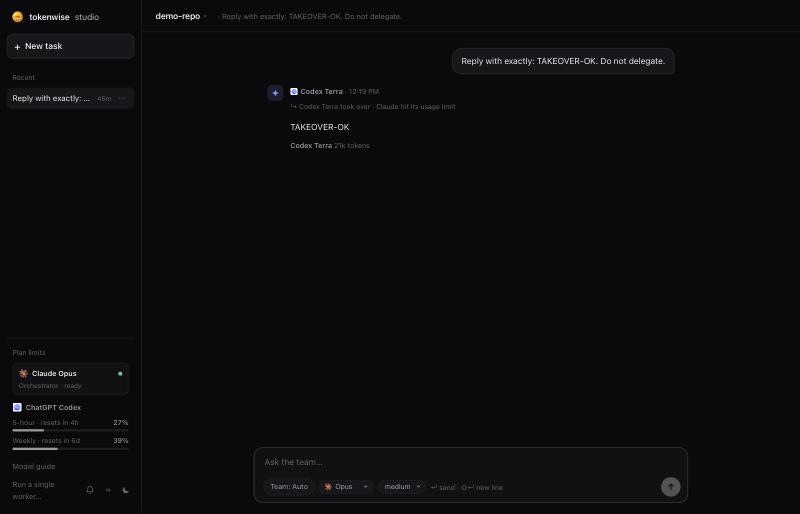
When Claude is at 90% of its 5-hour or weekly limit, or hits it mid-turn, Codex takes over the same message, read-only, with the same studio tools and the conversation so far.
Opus at low for a quick judgment call, Sonnet at high for a big routine refactor. Effort is chosen per piece, not per session.
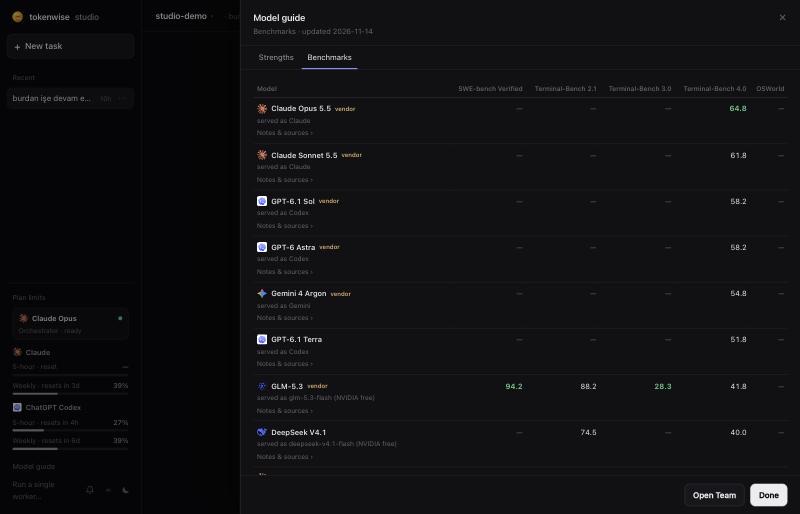
Free NVIDIA models (GLM, DeepSeek, Mistral…) read and edit files in a sandboxed worktree, ranked by Terminal-Bench 4.0 using the score of the version actually served. Opt-in.
The orchestrator can't edit your files. Every change comes from a worker you review before it lands.
See your Claude and ChatGPT 5-hour and weekly usage in the sidebar, plus who will handle your next message. Stale readings past their reset time are ignored.
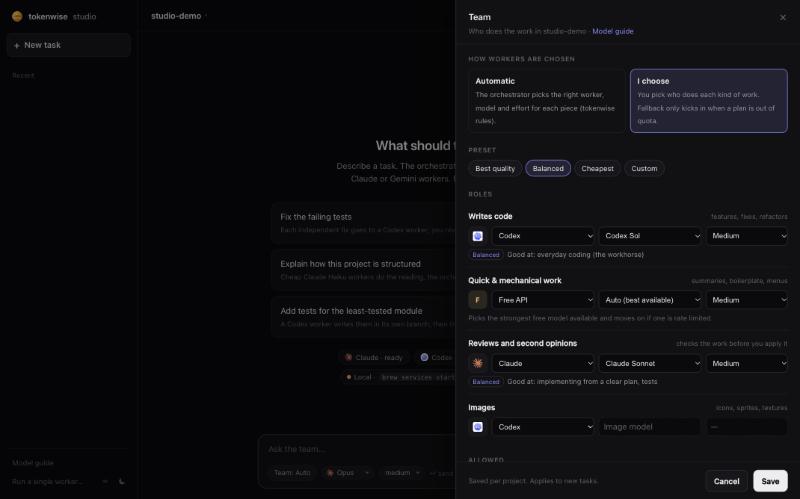
Automatic mode, or choose who writes code, who reviews and who draws images, with Best quality, Balanced and Cheapest presets.
A job is ready for review, finished or failed; an orchestrator turn is done; Codex took over. Click one to open that project's studio. A bell in the sidebar turns them off.
A native app with a Dock icon. Every project opens in its own window, and ⌘O opens another. Notifications open the right window.
We rank free models by Terminal-Bench 4.0, the official, independently run board, using the score of the version actually served. Vendor-reported numbers can overstate: Kimi K3 is listed at 88.3 on Terminal-Bench 2.1 and scores 22.4 on 4.0.
GPT-6.1 Sol scores the same 58.2 as GPT-6 Astra at about a fifth of the cost in the leaderboard runs ($634 vs $3.3k). See the official Terminal-Bench 4.0 board


Use the skill inside the agent you already like, or the studio to run a whole team from one screen. They work great together, and each works on its own.
A local web app: one orchestrator, many workers, live progress, per-file review and plan limits.
setup creates the Mac app in ~/Applications. tokenwise-studio opens your project in the app; add --browser for a browser tab. tokenwise-studio doctor shows which workers are ready; uninstall removes only what setup added.A skill for Claude Code, Codex CLI and Gemini CLI that picks the model and effort for each piece of work and hands it to cheaper subagents and other CLIs.
Yes. tokenwise and tokenwise studio are open source (MIT). They run on your machine and use the plans and CLIs you already have; there is no tokenwise account or server.
On small tasks the overhead is about even; the savings come from long sessions with lots of reading, where mechanical work goes to cheaper models and other plans. We publish our benchmark harness so you can measure it on your own work.
Only if you opt in. Free models are off until you add a key and set TOKENWISE_ALLOW_FREE=1, because free tiers may use prompts for training. They also never see secrets like .env files or keys.
Workers that edit files work in their own git worktree. Nothing reaches your project until you review the diff and press Apply, and applied changes are staged, not committed.
When Claude is at 90% or more of its 5-hour or weekly limit, or hits it mid-turn, Codex takes over the same message. It is read-only, has the same studio tools and sees the conversation so far. The chat shows "↪ Codex took over · Claude hit its usage limit", and the sidebar card shows who handles the next message. Turn this off with TOKENWISE_ORCH_FALLBACK=0. Gemini can't take over as orchestrator, because Antigravity has no per-session MCP; it still works as a worker.
macOS only. The first notification asks for permission, and tokenwise-studio setup triggers that prompt. After that, the tokenwise studio app notifies you when a job is ready for review, finished or failed, once per orchestrator turn in chats, and when Codex takes over. Clicking one opens that project's studio. The bell in the sidebar turns them off.
Node 20+, git, and at least one of Claude Code, the Codex CLI or Google Antigravity, signed in. macOS is the most tested platform. On macOS, setup builds the app with the Xcode command line tools if they are installed; otherwise the studio opens in the browser. Other platforms run it in the browser.
Install it in a minute and let your plans go further.